RM meaning in sales refers to the strategy, process, and software a sales team uses to manage relationships with prospects and customers. A CRM records contact details, conversations, deals, tasks, proposals, and next steps so the team can see what needs attention and move each opportunity toward a decision.
A sales CRM isn’t just an address book. Used properly, it becomes the working system behind your pipeline: who owns each lead, what the buyer needs, what happened during the last conversation, and what should happen next.
What does CRM meaning in sales refer to?
CRM stands for Customer Relationship Management.
The term covers three connected parts of sales work:
Part of CRM | What it means for sales |
|---|---|
Strategy | How the company plans to build and maintain customer relationships |
Process | The steps a lead follows from first contact to a buying decision |
Software | The system that stores customer data, deals, activities, and tasks |
TechTarget defines CRM as the combination of practices, strategies, and technologies companies use to manage and analyse customer interactions throughout the customer lifecycle. That distinction matters. Buying software doesn’t create a working CRM process unless the team agrees on what to record, when to update it, and how the information will guide action.
In a sales context, CRM focuses on lead ownership, opportunity management, pipeline stages, follow-up activity, proposals, forecasting, and closed-deal reporting.
What is the difference between CRM and CRM software?
CRM is the way a business manages customer relationships. CRM software is the tool used to apply that approach across a team.
A founder can manage customer relationships without dedicated software. Contact details may sit in a spreadsheet, meeting notes may live in documents, and follow-up dates may be added to a personal calendar. There is still a process, but it depends heavily on individual memory.
CRM software connects those records:
Contact and company details
Lead source
Calls, meetings, and emails
Open opportunities
Deal value
Expected close date
Sales owner
Next activity
Proposal files
Win and loss reasons
The software doesn’t replace the sales process. It gives that process a shared structure so information stays available when the team grows, responsibilities change, or someone is away.
How does CRM work in a sales process?
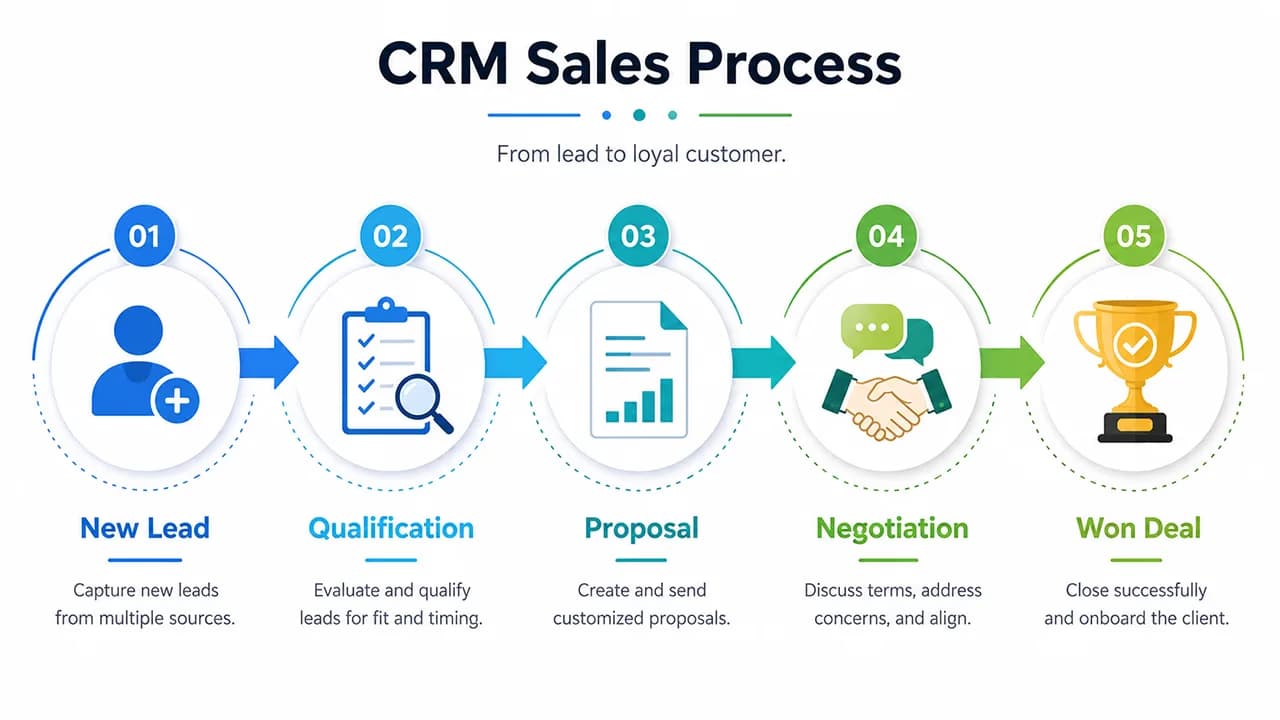
CRM turns the sales journey into visible stages. Each active opportunity moves from initial interest to a clear outcome.
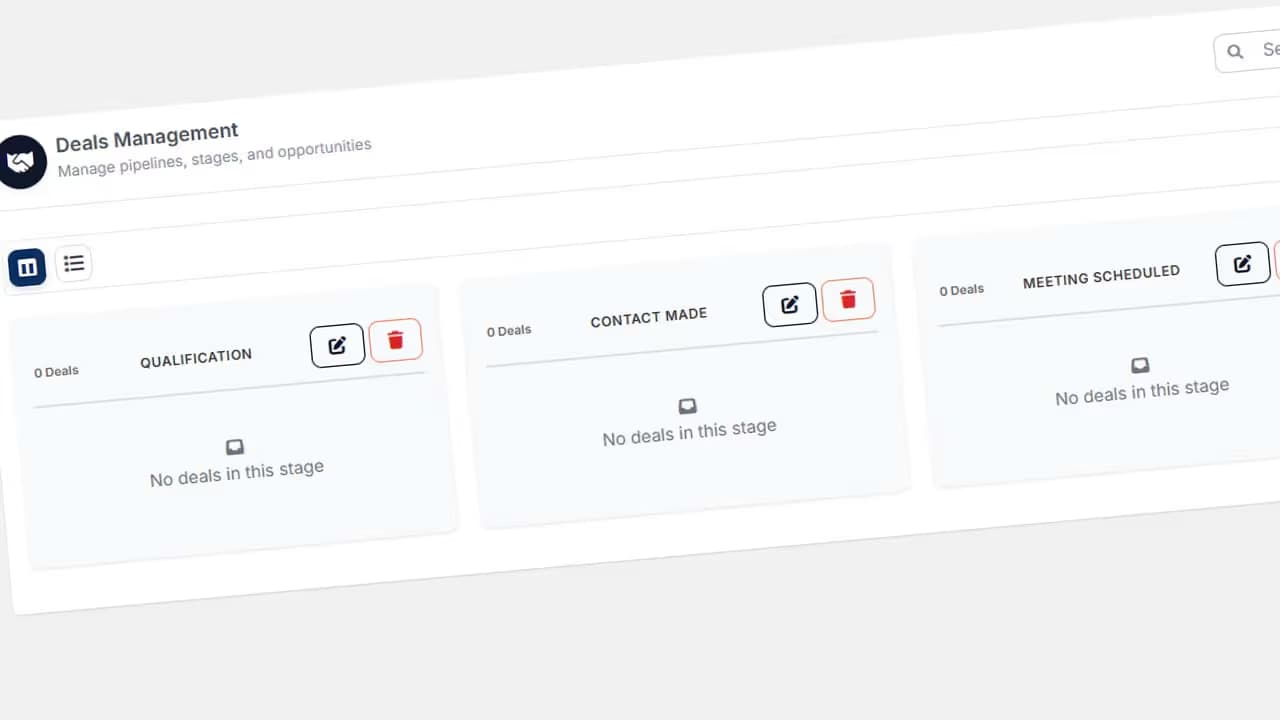
A sales pipeline is a visual representation of prospects and their position in the buying process. It helps representatives and managers see open deals, stalled opportunities, and the amount of potential business associated with each stage.
1. A lead enters the system
A lead may come from a website form, referral, event, outbound email, phone enquiry, or social platform.
The CRM creates a record containing the person’s details, company, source, initial request, and assigned owner. The enquiry no longer exists only in one employee’s inbox.
2. The lead is qualified
Not every enquiry should become a deal. The buyer may lack budget, authority, a clear need, or a realistic purchasing timeline.
A sales representative runs an initial discovery call and records the outcome. A suitable lead becomes an opportunity. An unsuitable one can be closed with a reason, kept for later, or returned to a marketing sequence.
3. The opportunity enters the pipeline
The opportunity record usually includes its value, stage, owner, expected close date, product or service, and related contacts.
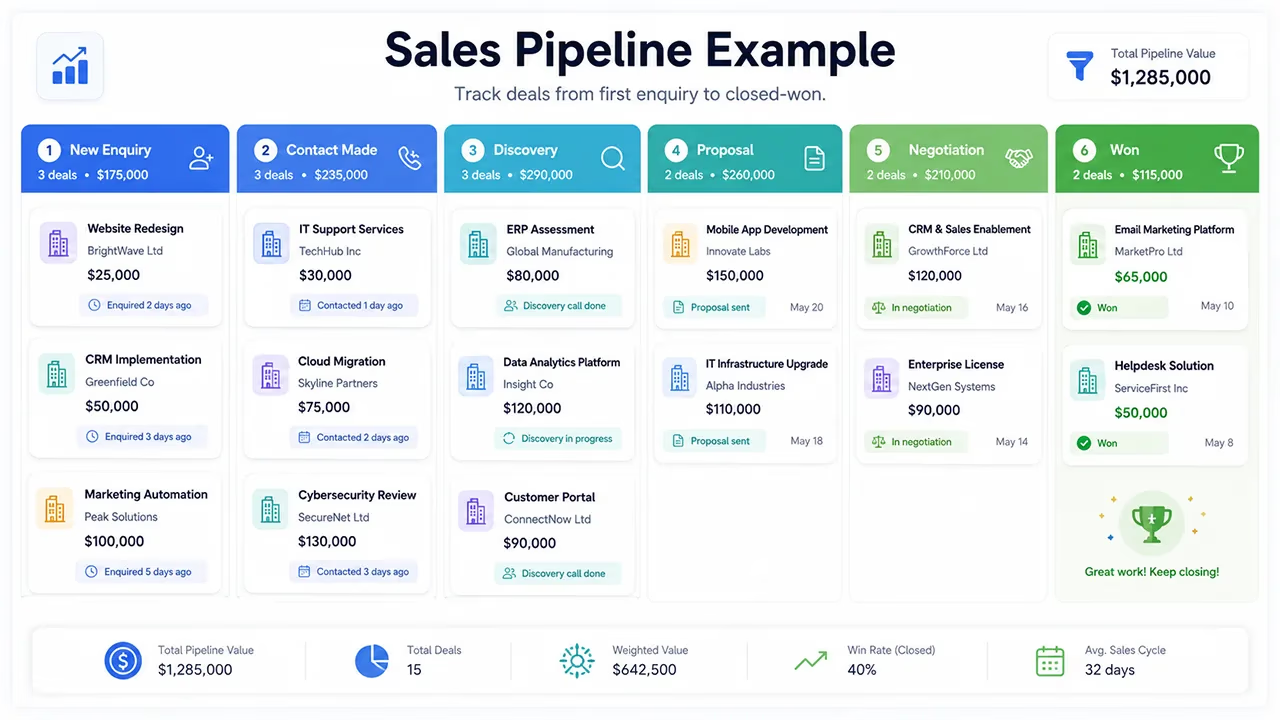
A B2B service pipeline might contain these stages:
New enquiry
Contact made
Discovery completed
Proposal sent
Negotiation
Won or lost
The stages should reflect the company’s real buying process. An agency, software company, consultancy, and wholesale distributor won’t need identical pipelines.
4. Activities and next steps are recorded
The CRM stores completed calls, meetings, emails, and notes. More importantly, it should show what happens next.
“Proposal sent” is incomplete as an update. A more useful entry would say:
Proposal sent on 12 July. The client will review it internally on Friday. Follow-up call booked for Monday at 11:00.
That note gives another team member enough context to continue the conversation. It also turns a vague opportunity into a scheduled sales action.
5. The proposal and decision are tracked
Sending a proposal doesn’t finish the sale. Many deals stall because nobody agrees on a follow-up date.
A CRM can create the next task, store the proposal, list the decision-makers, record objections, and show the target decision date. The representative can then manage the deal rather than repeatedly searching through email threads.
6. The outcome is recorded
A won opportunity can move into onboarding, delivery, or account management. The final value, product, close date, and customer details remain linked.
Lost deals should remain in the system too. Price, timing, missing functionality, a competing supplier, or an internal cancellation can be selected as the reason. Over time, those records reveal patterns that are invisible when unsuccessful opportunities are simply deleted.
What information does a sales CRM store?
The labels differ between platforms, but most sales systems use the same underlying record types.
Forrester describes leads, contacts, accounts, and opportunities as four foundational objects in sales force automation. Small-business systems may present them under simpler labels such as people, companies, and deals.
Contacts
A contact record represents an individual. It may include their name, role, email address, phone number, communication preference, and interaction history.
Companies or accounts
In B2B sales, several contacts may belong to one company. A budget owner, department head, end user, and procurement contact can all take part in the same purchase.
The company record links those people and gives the team a shared account history.
Deals or opportunities
A deal represents a possible sale. The record can contain its value, product, stage, owner, expected decision date, associated contacts, and sales notes.
Activities
Calls, meetings, emails, tasks, and follow-up dates are recorded as activities.
A pipeline without activity data is a board full of coloured cards. Sales movement becomes meaningful when each active deal has a completed step and a scheduled next action.
Notes, proposals, and files
Discovery notes, briefs, presentations, contracts, and proposals can be attached to the relevant person, company, or deal. Team members don’t need to search several messaging channels to find the latest version.
What does CRM software do for a sales team?
The value of CRM software isn’t the volume of data it stores. Its value comes from making the next sales decision easier.
It creates a shared customer record
Customer details no longer sit across personal phones, private inboxes, and disconnected spreadsheets. A founder can review the latest interaction without asking the representative to reconstruct the story.
This becomes particularly useful when responsibilities change. An opportunity doesn’t disappear with the employee who created it.
It makes ownership visible
Each lead or deal can be assigned to a named user. The team can see who is responsible for the next step.
Shared logins remove that clarity. When five people use one account, it becomes difficult to tell who contacted the customer, who changed the deal stage, or who missed the follow-up.
It reduces missed follow-ups
Every open opportunity should have a next step and a date. Representatives can start the day with a list of calls, meetings, and overdue tasks instead of checking several calendars.
Let’s be honest: no CRM makes data entry entertaining. A brief note and a follow-up date still take less time than trying to remember the details of a three-week-old proposal.
It makes the pipeline visible
Managers can see deals that are moving, deals that have stalled, and opportunities expected to close during a selected period.
This view isn’t a guarantee of future revenue. The forecast is only as reliable as the values, stages, and close dates entered by the team.
It reduces manual reporting
When records stay current, a manager doesn’t need to merge several spreadsheets before a weekly sales meeting. The same data can be filtered by representative, source, stage, period, outcome, or loss reason.
Reporting should answer business questions. Which source creates suitable opportunities? Where do deals slow down? Which service attracts interest but rarely closes? A CRM gives the team a consistent dataset for those discussions.
A practical CRM example for a six-person agency
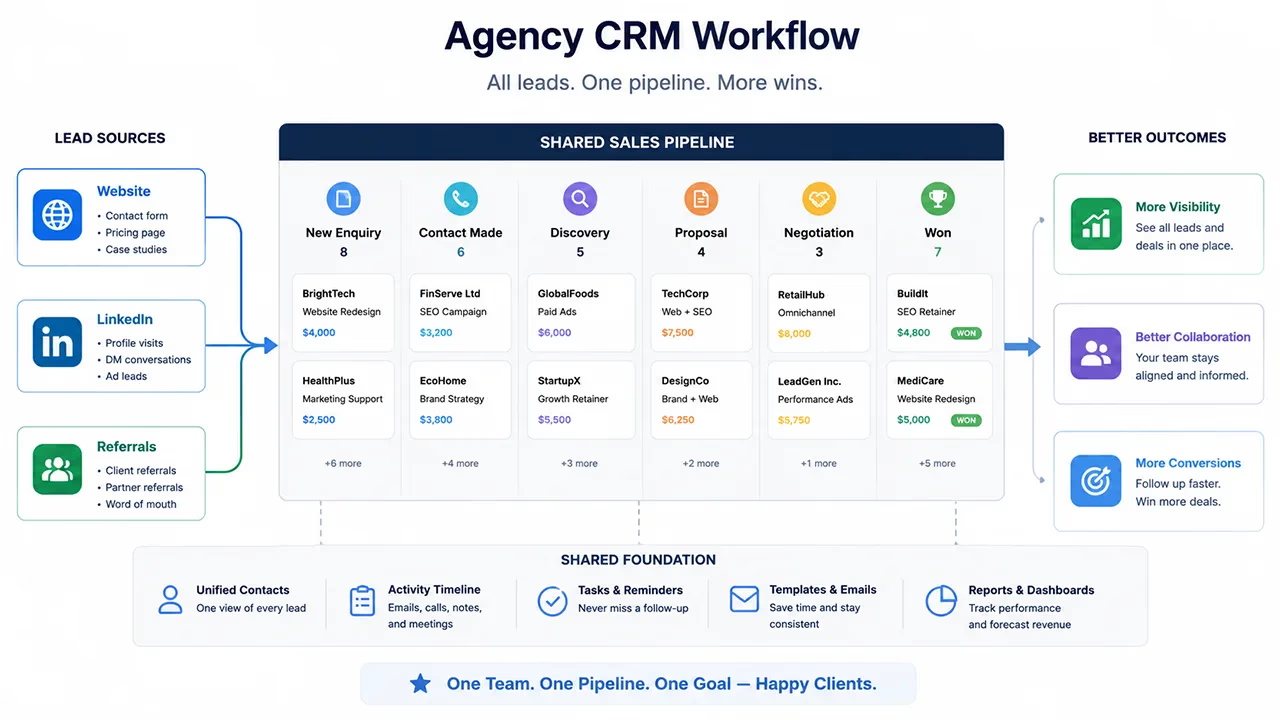
Picture a digital agency with six employees. The founder still joins sales calls, two account managers handle existing clients, and new enquiries arrive through referrals, LinkedIn, and the website.
Without a shared CRM, the process may look like this:
Website forms arrive in a shared mailbox.
LinkedIn conversations stay in personal accounts.
Proposals are saved in different folders.
The founder asks everyone for updates each Monday.
A prospect complains that nobody followed up.
The team spends ten minutes working out who owned the enquiry.
With CRM software, every enquiry enters one system with its source. The founder assigns an owner, a deal is created after discovery, the proposal date is recorded, and the next task is scheduled.
The Monday meeting changes too. Instead of spending most of the time asking what happened, the team reviews deals without activity, decisions expected soon, and opportunities where the representative needs help.
What is the difference between CRM and a spreadsheet?
A spreadsheet can work as a small contact list. It starts to struggle when several people must manage active sales work.
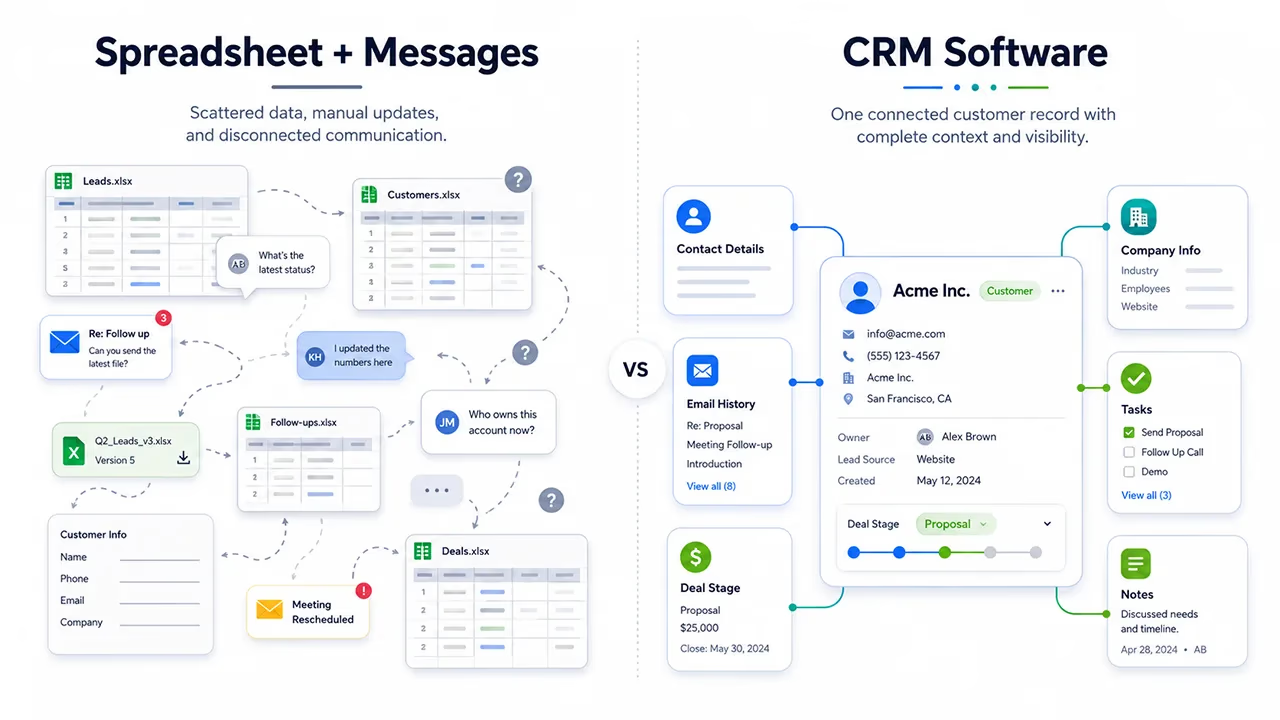
Capability | Spreadsheet | Sales CRM |
|---|---|---|
Contact storage | Yes | Yes |
Pipeline stages | Manually created columns | Managed through a visual pipeline |
Deal ownership | Entered as text | Assigned to a user |
Follow-up reminders | Separate calendar or manual check | Scheduled tasks and dates |
Interaction history | Spread across cells or files | Linked to the customer and deal |
User activity | Limited | Tracked by account |
Reporting | Built with formulas and manual updates | Generated from sales records |
Automation | Limited or handled by other tools | Supported through workflows |
A two-person firm with ten enquiries a month may work well from a carefully maintained spreadsheet. That same approach becomes fragile when the firm handles fifty enquiries, longer sales cycles, or several representatives speaking to the same companies.
Team size isn’t the only signal. The number of open deals, the length of the buying process, and the frequency of follow-up are often better indicators.
What is the difference between CRM and a contact database?
A contact database tells you who someone is. A CRM tells you what the relationship looks like and what should happen next.
A phone number alone doesn’t provide sales context. The representative also needs to know:
Is this person involved in the decision?
Which company do they represent?
What are they trying to solve?
Has a proposal been sent?
Which objection did they raise?
Who owns the opportunity?
When should the team contact them again?
CRM connects identity, conversation history, commercial interest, and planned activity.
Is CRM the same as marketing automation?
No. CRM and marketing automation may exchange data, but they support different parts of the customer journey.
Marketing automation usually manages campaigns, forms, email sequences, audience segments, and lead nurturing. Sales CRM focuses on assigned leads, discovery calls, opportunities, proposals, follow-up, and buying decisions.
A prospect may first download a resource. The marketing system records the form submission and campaign source. Once the person meets the sales criteria, the lead is sent to the CRM and assigned to a representative.
A small business may not need two separate platforms at first. Start with the broken part of the process. A sales CRM makes sense when enquiries exist but aren’t followed consistently. It won’t create demand on its own when the company lacks a lead generation channel.
How do small and medium-sized businesses use CRM?
A small-business CRM shouldn’t copy an enterprise sales operation. Too many fields and approval steps can slow down a team that needs a clear daily workflow.
A useful setup should answer a small set of questions:
Where did the enquiry come from?
Who owns it?
What stage is the deal in?
What happens next?
When will that action happen?
What is the expected value?
Was the opportunity won or lost?
Why was it lost?
Once the team can answer these questions from one screen, the system has started to provide value.
One mistake we often see during CRM migrations is copying every column from the old spreadsheet. A field that nobody has used for two years won’t become useful because it moved into a new platform. Transfer the data needed for customer context, ownership, action, and reporting.
How can agencies use CRM?
Agency sales often begin with an unclear request. A company asks for social media management, but the discovery call reveals that the real need is paid acquisition, creative production, and reporting.
CRM keeps that discovery history linked to the opportunity. Agencies can track:
Requested service
Project or monthly budget
Decision-makers
Current supplier
Discovery notes
Proposal date
Expected start date
Presentation and proposal files
Reason for loss
The same company may have several opportunities over time. A website project can close this month, while a separate SEO deal opens six months later. Each deal follows its own pipeline while the full company history remains available.
How can business owners use CRM?
A founder doesn’t need to read every sales note. The system should point to areas that require a decision or intervention.
A useful owner view may contain:
Deals expected to close this month
Opportunities without recent activity
Overdue follow-up tasks
Pipeline by representative
New leads by source
Won and lost value
Loss reasons
Deals with no scheduled next action
The purpose isn’t to monitor every click made by the team. The owner needs to see where support is required, which target is at risk, and where the sales process is slowing down.
Representatives must receive value too. If CRM exists only to feed a management report, they’ll treat it as administrative work. A clear task list, accessible conversation history, ownership, and quick proposal access give the sales team a reason to keep the records current.
When does a business need CRM software?
There isn’t one minimum employee count that determines when CRM becomes necessary. Look for recurring operational problems instead:
Customer information sits in personal accounts.
Two employees contact the same prospect without knowing it.
Proposals are sent but follow-ups are missed.
The founder collects weekly updates through messages.
Nobody can cover a colleague’s pipeline during leave.
Lead sources aren’t connected to sales outcomes.
The value of open opportunities can’t be trusted.
Lost-deal reasons aren’t recorded.
An isolated mistake doesn’t always justify another software subscription. A problem that appears every week usually points to a missing sales system.
What should you look for in CRM software?
The CRM with the longest feature list isn’t automatically the right choice. Unused functions add menus, setup work, and cost without helping the team sell.
Fast daily use
A representative should be able to record a note and schedule the next action without opening several screens. If basic updates take too long, data quality will fall.
Flexible pipelines
The stages should match the actual buying process. Templates can provide a starting point, but the team should be able to rename stages and define what must happen before a deal moves forward.
Clear user ownership
Each team member should use an individual account. The system should show the record owner, activity creator, and overdue tasks by user.
Useful reporting
The team should be able to review performance by period, representative, source, stage, value, outcome, and loss reason. Constantly exporting data for routine reports defeats part of the purpose of CRM.
Data migration
Contacts, companies, and open deals should be importable from spreadsheets or another platform. Test the mapping with a small sample before moving the full dataset.
Automation and integrations
Workflows can assign leads, schedule tasks, or send notifications after a stage change. Automation should support a process that already makes sense. Automating an unclear workflow only creates confusion more quickly.
How do you implement a sales CRM?
Treat implementation as a sales process project rather than a software installation.
Step 1: Map the current sales process
Write down where enquiries come from, who responds, which conversations happen, how proposals are created, and what marks a final decision.
Start with the process the team actually follows, not the version written in an old policy document.
Step 2: Define pipeline stages
Each stage should represent an observable event. “Interested” is subjective. “Discovery meeting completed” or “proposal sent” gives the team a shared definition.
Step 3: Limit required fields
Ask for the information needed to decide, act, and report. A long form filled with fields that nobody uses encourages incomplete or inaccurate records.
Step 4: Clean the data before migration
Remove duplicate contacts, invalid addresses, and abandoned deals that no longer belong in the active pipeline. Moving the same disorder into a new tool isn’t a successful migration.
Step 5: Start with active opportunities
Don’t ask the team to rebuild years of customer history on the first day. Import active deals and new leads first. Add older records when they provide real context.
Step 6: Run pipeline meetings from the CRM
If the weekly meeting still depends on a separate spreadsheet, the team has little reason to update the CRM. Review the live pipeline directly. Missing fields, unclear stages, and overdue actions will become visible during normal work.
What are the most common CRM mistakes?
Building CRM only for management reporting
Representatives enter information, but the system gives them nothing in return. Tasks, history, proposal access, and reminders should support their day as well as the manager’s dashboard.
Asking for too much data
Adding a field for every possible future question doesn’t create useful records. Fields that don’t affect decisions or actions will be skipped.
Using unclear stage definitions
One salesperson may move a deal to “Negotiation” after sending the proposal. Another may wait until the buyer asks for a discount. The report becomes inconsistent because the team isn’t measuring the same event.
Leaving deals without next steps
An open deal without a scheduled activity is a card sitting in a pipeline. Every active opportunity should contain a next action, owner, and date.
Deleting lost opportunities
Lost deals show where the offer or sales process fails. The company can’t compare price objections, timing problems, product gaps, or competitor losses if the records disappear.
Automating too early
Automation works best after the team has tested the process. If stage meanings and ownership rules remain unclear, automated tasks and notifications add noise.
Where does Cocopipe fit into a sales CRM process?
Cocopipe is an AI-supported CRM and sales management platform designed for sales-focused businesses with 3 to 50 employees. It brings people, companies, deals, pipelines, tasks, activities, proposals, and reporting into one sales workflow.
The goal isn’t to make the team enter more data. It’s to make ownership and the next step visible across every active deal. Opportunities can be assigned, follow-ups can be scheduled, and pipeline movement can be reviewed from a shared view.
The Cocopipe CRM platform explains how customer records and opportunities are organised. The Cocopipe sales management platform covers pipeline, task, and sales execution features.
A small team doesn’t need to start with a large automation project. Import the current customer list, create the real pipeline stages, and give every open opportunity a scheduled next action. That is where the first operational value appears.
What should your sales team do next?
A tidy customer list isn’t a shared sales system when follow-ups still live in personal calendars. Review every open opportunity from the past 30 days and assign five pieces of information: owner, stage, value, next action, and date.
When maintaining that view in a spreadsheet starts to require constant reminders, it’s time to move the workflow into CRM software. Review Cocopipe’s sales management features to build the same structure in a shared pipeline.
6. FAQ
What does CRM mean in sales?
CRM in sales means the strategy, process, and software used to manage relationships with prospects and customers. It stores contact details, conversations, deals, tasks, proposals, and follow-up dates so sales teams can see where each opportunity stands and what should happen next.
What does CRM stand for?
CRM stands for Customer Relationship Management. The term can refer to the company’s approach to managing customer relationships or the software used to organise customer data and sales activity.
What is sales CRM software used for?
Sales CRM software is used to record leads, manage opportunities, track pipeline stages, store interaction history, and schedule follow-ups. Managers use it to review open business and performance, while representatives use it to organise daily sales work.
Do small businesses need a CRM?
A small business may need CRM when customer information is spread across several tools, follow-ups are missed, or more than one employee manages the same accounts. A simple spreadsheet may still work for a very small team with few enquiries and a short sales cycle.
What is the difference between CRM and Excel?
Excel stores data in rows and columns. CRM connects contacts, companies, deals, activities, owners, and tasks. It also provides pipeline views, follow-up reminders, interaction history, user-level access, and reporting based on live sales records.
Is CRM only for sales teams?
CRM isn’t limited to sales. Marketing, customer support, account management, and customer success teams can use the same customer records. A sales CRM places more attention on leads, opportunities, proposals, follow-up, and closing activity.